
Getting Started: Account Creation, Signup & KYC
A complete guide to registering your BitHash account, verifying institutional credentials, and completing UAE AML/CFT compliant KYC verification.
1. Overview & Account Architecture
Enterprise-grade digital infrastructure governed by UAE regulatory standards
Welcome to BitHash. Our platform provides institutional-grade cryptocurrency mining infrastructure, turnkey UAE hosting colocation, and transparent Stratum hashrate delegation. Before deploying computational capacity or configuring daily automated Bitcoin payouts, every client establishes an authenticated portal identity.
Your BitHash profile acts as your central command center. It binds your legal identity, colocation agreements, F2Pool mining subaccount telemetry, and daily payout settlement records into a single cryptographic dashboard.
BitHash operates in strict adherence with United Arab Emirates regulatory statutes governing digital asset infrastructure across Dubai and Abu Dhabi under Federal Decree-Law No. (20) of 2018 on Anti-Money Laundering (AML) and Countering the Financing of Terrorism (CFT).
2. Step-by-Step Registration Guide
From initial registration to authenticated dashboard access in under 3 minutes
Registering for BitHash is straightforward. Follow the verified workflow below to initialize your client portal account:
Execution Steps:
Navigate to the Secure Registration Portal
Visit https://bithash.ae/login and select 'Create an Account'. Ensure your browser bar displays the secure SSL lock icon and official domain.
Submit Your Primary Credentials
Enter your full legal name, institutional or personal email address, and an active WhatsApp contact number. Your WhatsApp number is utilized for mission-critical machine alerts and 2FA recovery backup.
Establish a High-Entropy Password
Generate a unique passphrase containing at least 12 characters, including uppercase letters, numerals, and special cryptographic symbols.
Verify Your Email Address
A 6-digit one-time cryptographic confirmation code will be dispatched to your inbox. Enter this code within 15 minutes to activate portal access.
3. UAE AML/CFT KYC Verification Tiers
Transparent document submission requirements for personal and institutional accounts
To satisfy UAE regulatory compliance and international banking requirements, BitHash implements a structured two-tier KYC verification framework. Computational hardware deployment and on-chain payout processing require verified identity status.
Below is a breakdown of verification thresholds and necessary documentation:
| Verification Tier | Target Client | Required Documentation | Processing SLA |
|---|---|---|---|
| Tier 1: Standard Individual | Retail hashrate & small miner buyers (< 5 ASICs) | Valid Passport or UAE Emirates ID + Liveness facial scan | Instant to 15 Minutes (Automated) |
| Tier 2: Institutional VIP | Datacenter colocation fleets & high-volume cloud slicing (> 5 ASICs) | Company Trade License, Certificate of Incumbency, Proof of Address & UBO Declaration | 2 to 6 Business Hours (Compliance Desk) |
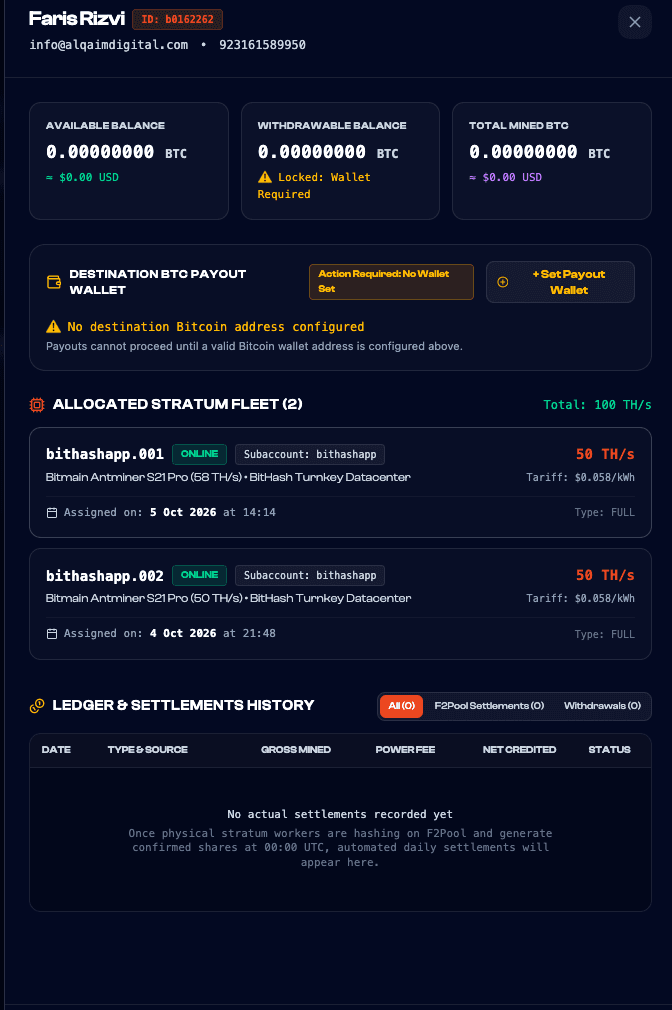
Figure 1.1: Verification prompt showing active compliance checks, identity validation status, and wallet binding requirements prior to miner deployment.
4. Setting Up 2FA Security Vault
Protecting mining rewards and hardware configurations with Time-Based OTP (TOTP)
Securing your BitHash account with Two-Factor Authentication (2FA) is mandatory before assigning payout wallets or modifying datacenter configurations. We support all RFC 6238 compliant TOTP authenticators.
To enable 2FA: navigate to Profile Settings > Security Vault > Enable 2FA. Scan the presented QR code with Google Authenticator, Authy, or 1Password, and record the 16-character alphanumeric backup emergency recovery key in a secure physical location.
5. Frequently Asked Questions
Common questions regarding account registration and verification
Here are the most frequently asked questions by new clients: