Wallet & Payout Setup: Automated 00:00 UTC Pool Settlement
A complete guide to configuring your Bitcoin payout address, F2Pool subaccount binding, daily automated payouts at 00:00 UTC, and anti-drainer security.
1. Non-Custodial Architecture & Principles
Direct on-chain mining pool payouts straight from F2Pool to your cold storage
Unlike legacy cloud mining schemes that hold client earnings in proprietary internal ledgers, BitHash operates on a strict non-custodial payout model.
When you add a Bitcoin wallet address to your BitHash profile, our backend binds your wallet directly into F2Pool's pool settlement engine. Daily mining payouts are broadcast directly by F2Pool to your personal Bitcoin address on the blockchain.
BitHash never touches, custodies, or delays your earned Bitcoin.
2. Step-by-Step Wallet Configuration
Supported address formats and verification workflow
BitHash supports all standard Bitcoin address formats:
• Native SegWit (Bech32 - `bc1q...`): Recommended for lowest transaction fees.
• Taproot (Bech32m - `bc1p...`): Full support for modern Taproot script addresses.
• Legacy & Nested SegWit (`1...` or `3...`): Fully supported across all pool endpoints.
Execution Steps:
Navigate to Dashboard Settings > Wallet
Log into your client portal and navigate to Settings > Payout Configuration.
Enter Your Bitcoin Address
Paste your Bitcoin receive address into the field. Double-check the first and last 6 characters to prevent clipboard-hijacking malware.
Authenticate with 2FA
Enter your 6-digit Time-Based One-Time Password (TOTP) from your authenticator app to authorize the wallet change.
Subaccount Synchronization
Our automated integration synchronizes the wallet with F2Pool. A confirmation receipt is dispatched via email and WhatsApp.
3. F2Pool Subaccount-Level Binding Rules
How BitHash handles wallet updates across shared and dedicated subaccounts
When an administrator or automated system provisions a subaccount or assigns workers, four specific wallet handling conditions are enforced:
1. User has wallet, F2Pool subaccount does not: The system displays a confirmation prompt with a checkmark to dispatch the user's wallet address directly to F2Pool.
2. User has NO wallet, F2Pool subaccount has a wallet: The system prompts the administrator to clear the old F2Pool address to prevent accidental misdirected payouts, and provides a 'Send Wallet Reminder' button to notify the user via WhatsApp/Email.
3. User has wallet, F2Pool subaccount has a wallet: If addresses match, a green verification badge is displayed. If they do not match, the administrator is asked whether to override with the user's new address or preserve the existing configuration.
4. Neither has a wallet: Payouts accumulate safely within F2Pool balance without automated withdrawal. An automated prompt provides a one-click reminder to the user to configure their wallet.
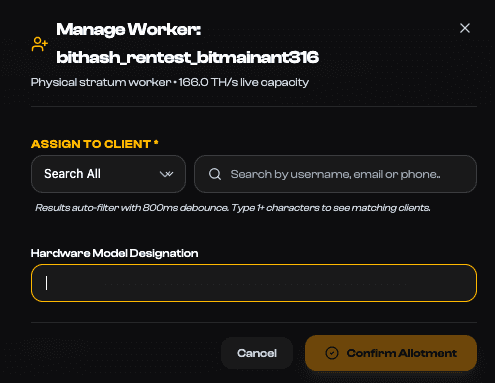
Figure 4.1: Subaccount assignment modal showing wallet validation check, custom contract duration, and F2Pool payout binding prompt.
4. Payout Schedule, Thresholds & Electricity Netting
Daily 00:00 UTC automated cycle and minimum withdrawal rules
F2Pool executes automated payouts once every 24 hours at 00:00 UTC (04:00 AM UAE Gulf Standard Time).
• Minimum Payout Threshold: The standard default threshold is 0.005 BTC. If your daily yield is below 0.005 BTC, rewards accumulate on your balance and dispatch automatically once the threshold is crossed.
• Threshold Customization: Enterprise clients with over 500 TH/s may adjust their payout threshold up to 5.0 BTC in settings to minimize transaction count.
• Network Fee Handling: Standard Bitcoin miner transaction fees are covered directly by F2Pool FPPS+ settlement rules; BitHash adds zero withdrawal surcharge.
• Electricity Netting Option: For turnkey hosting clients, power expenses can either be settled via monthly credit card / wire invoice or automatically netted from daily Bitcoin yields.
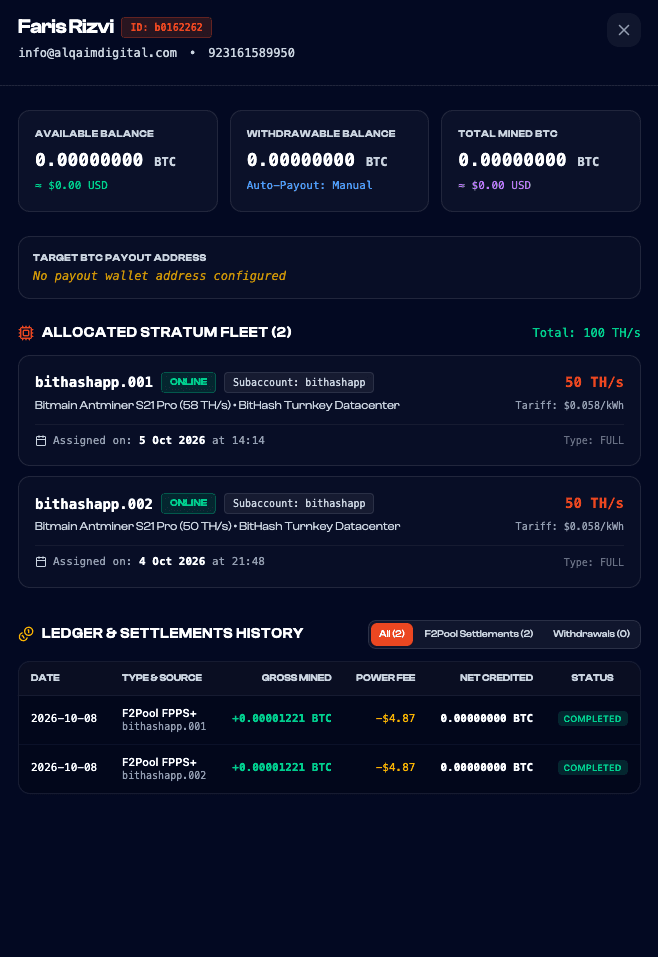
Figure 4.2: Client Stratum Ledger showing daily 00:00 UTC payout broadcasts, net Bitcoin distributions, and transaction confirmations on mempool.space.
5. 72-Hour Anti-Drainer Security Vault
Cryptographic quarantine protecting accounts from unauthorized withdrawals
To provide bulletproof defense against phishing attacks, session hijacking, or SIM swaps, BitHash enforces an immutable 72-Hour Anti-Drainer Quarantine Vault.
Whenever a payout wallet address is added or modified, a 72-hour quarantine timer is initiated. During these 72 hours:
• Automated email and WhatsApp alerts are dispatched to the account owner immediately.
• Daily mining yields continue accumulating safely in your F2Pool account without disruption.
• Outgoing withdrawals to the new address are paused until the 72-hour safety window concludes.
• If the change was unauthorized, the account owner can click a one-touch 'Freeze Payouts' button in their email alert to freeze withdrawals and alert NOC security.
6. Frequently Asked Questions
Common payout and wallet configuration questions
Key answers regarding Bitcoin payouts and thresholds: