
User Dashboard: Complete Feature & Telemetry Manual
A complete walkthrough of every section in the BitHash client dashboard: live telemetry, worker status, profitability calculator, contracts, and settlement records.
1. Dashboard Navigation & Layout
Centralized mission control for all computational assets and mining revenues
The BitHash Client Dashboard (https://bithash.ae/dashboard) provides an intuitive, high-performance interface for managing your mining operations. Designed for institutional transparency, it communicates directly with our datacenter API and F2Pool stratum endpoints.
The top navigation bar displays your active account status, verified KYC badge, cumulative daily yield, and instant wallet balance. The main workspace organizes your assets into five distinct functional panels: Overview, Workers, Simulator, Contracts, and Settlements.
2. Hashrate Telemetry (10m, 1h, 24h & Uptime)
Mathematical breakdown of sliding-window averages and SLA uptime tracking
Because Bitcoin mining is a probabilistic proof-of-work algorithm, raw mathematical share submissions naturally fluctuate minute-to-minute. To provide an authentic, mathematically sound operational view, your dashboard reports three standardized hashrate benchmarks:
• 10-Minute Hashrate (th10m): The instant calculation of shares received in the trailing 600 seconds. This is your primary diagnostic metric for identifying chip drops or network jitter immediately.
• 1-Hour Average (th1h): The thermal stability benchmark. Evaluates performance consistency under ambient temperature fluctuations.
• 24-Hour Average (th24h): The cumulative mathematical shares submitted over the last 86,400 seconds. This exact metric governs daily FPPS+ pool revenue distribution.
• 24h Uptime Ratio (%): Rather than tracking volatile network latency, BitHash calculates uptime using our automated 24-hour background cron engine. When a worker goes offline, the exact offline duration is measured and divided against the 86,400 seconds in a day: Uptime % = ((86,400 - offline_seconds) / 86,400) * 100.
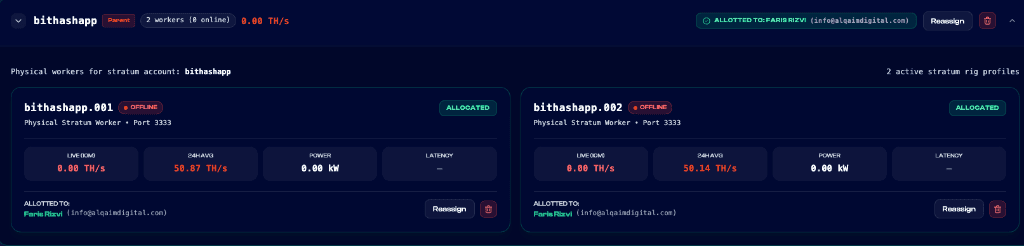
Figure 3.1: Live worker status telemetry displaying offline timestamp tracking, 24-hour mathematical uptime ratio percentage, and power credit adjustment calculation.
3. F2Pool Worker Hierarchy & Accordions
Granular visibility into every physical machine and virtual slice
To provide clean fleet organization, workers are grouped under their parent F2Pool subaccounts using collapsible accordions. Clicking an accordion expands the complete machine roster:
• Worker Identifier: Follows the standard naming convention [subaccount].[worker_tag] (e.g. bithashapp.001).
• Hardware Telemetry: Displays current chip temperature, fan RPMs, MAC address, and datacenter rack location.
• Observer Link: An official, cryptographically authenticated read-only link to view your machines directly on F2Pool.com without logging into BitHash.
• Quick Actions: One-click remote reboot, stratum pool failover routing, and diagnostic log exports.
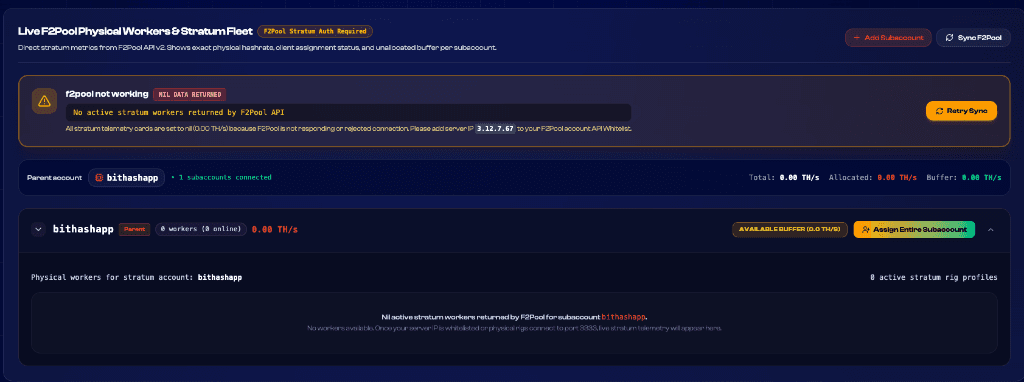
Figure 3.2: F2Pool Subaccount Accordion View displaying nested worker rosters under master subaccounts, real-time hashrate summaries, and individual machine allocation statuses.
4. Profitability & Yield Simulation Engine
Live FPPS+ calculations based on real network difficulty and power tariffs
The interactive Profitability Simulator built into your dashboard allows you to model forward-looking mining revenue under changing market conditions. The engine computes:
• Gross Bitcoin Output: Benchmarked against standard FPPS+ network return (~0.00000058 BTC per TH/day).
• Power Expense Deductions: Computed at standard modern hardware efficiency (24.5 J/TH) multiplied by your contracted power tariff ($0.058/kWh).
• Net Projected Profitability: Displays both daily BTC accumulation and USD equivalent based on live spot exchange rates.
5. Active Contracts, Orders & Daily Settlements
Complete financial transparency with downloadable audit-ready accounting records
The Settlements tab provides an immutable record of every transaction on your account:
• Daily Mining Yields: Real-time credits from F2Pool block rewards generated every 24 hours.
• Electricity Netting Statements: Itemized electricity cost deductions based on exact kilowatt-hours consumed.
• On-Chain Payout Hashes: Clickable Bitcoin transaction IDs (TXIDs) verifying automated withdrawals dispatched to your wallet.
• CSV Accounting Export: Download full tax-compliant spreadsheets for your bookkeeping and corporate filing.
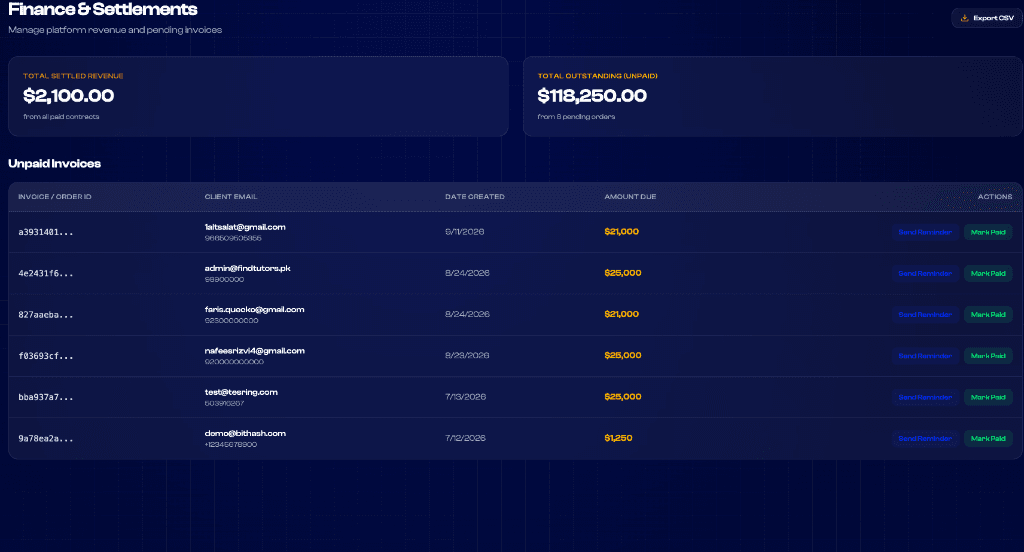
Figure 3.3: Financial settlement cockpit detailing gross block rewards, electricity netting deductions, and net automated payouts dispatched to customer wallets.
6. Frequently Asked Questions
Navigating your dashboard and understanding telemetry
Key answers regarding dashboard telemetry and metrics: